Why I Needed a Single Place for My Notes
This year, I decided it was time to simplify where I store my notes and cut back on subscription costs. I had been using Evernote while also relying on Google Drive, and I realised I was spending both time and money managing information across multiple platforms.
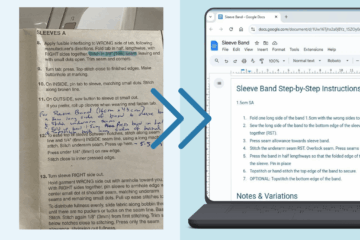
For a maker like me, having a single “source of truth” isn’t just convenient—it’s essential. I moved all my Evernote notes to Google Drive, and in this post, I’ll focus on my sewing notes as examples to show how the process works. Now everything lives in one central, searchable place, making it easier to find what I need and saving money in the process.
Evernote and Google Drive: Juggling Notes
I’ve been using Evernote since 2013 to store all sorts of notes that I could access on any device. Early on, I started documenting sewing techniques I kept forgetting, along with patterns I owned — including details on sizing, materials, and notions I could quickly reference at the fabric store. Over the years, my notes grew to include:
-
Book summaries
-
Purchasing research
-
University lesson notes
-
Notes from doctor appointments
-
Presentations, etc
A fun sidenote: my very first Evernote note was a book summary of Head First Software Development by Dan Pilone, back when I was working as a computer programmer.
In 2023, Evernote changed its free plan: accounts were limited to 50 notes and a single notebook. With over 3,000 notes, I had no choice but to pay. At the same time, I had already been paying for extra Google Drive storage since 2016.
Over time, I realised I was spending too much time deciding where to put new notes and searching across multiple platforms. I wanted one true source of truth.
Finding a Migration Solution with CloudHQ
At the end of 2024, I started looking for a way to migrate Evernote notes to Google Drive and couldn’t find anything. So, I continued using Evernote sparingly while adding new notes to Google Drive, transferring only what I still needed.
Then, in November 2025, I discovered CloudHQ. It was suggested when I asked ChatGPT how to move everything from Evernote to Google Drive. After some research — a few YouTube videos and Reddit posts — I realised it was exactly what I needed. It could create a Google Doc for every single one of my notes.
I set up a CloudHQ account with a free 15-day trial that allows you to sync up to 2GB between platforms.

Following the instructions from CloudHQ, I gave it access to my Evernote and Google Drive accounts, created a folder in Google Drive called \Evernote Backup – 2025, and started the sync.
“Ten hours later, all 870MB — 6,000 files in total — had been synced. My 3,000 Evernote notes became 6,000 files because each note’s images were included in the Google Doc and as separate image files in subdirectories.”
Sync Results with CloudHQ and What I Learned
I checked a few of the Google Doc files, and everything was copied across perfectly.
For now, I’ll treat it as an archive. As I need information, I’ll move it into the relevant folder. The important thing is that everything is now in one place — my source of truth. One place to search, one place to find what I’m after.
Once I was confident that everything had been synced, I cancelled both my CloudHQ and Evernote subscriptions.
The Benefits for My Sewing Workflow
Having all my notes in Google Drive has simplified my workflow immensely:
No more deciding whether a note belongs in Evernote or Google Drive
Everything lives in one searchable space
Old sewing techniques and notes are easy to find
I saved A$160 a year by cancelling Evernote
To help you get started with your own notes, I’ve created a free sewing instructions template you can download and use (available as a Google Doc and Microsoft Word ). It’s a simple way to keep all your sewing techniques in one searchable place — your own personal source of truth.
“Having a single source of truth isn’t just convenient — it saves time and keeps your creativity organized.”
For makers who like to document and reference their work, this approach keeps your creativity flowing, saves time, and ensures your notes are always easily searchable.

0 Comments